Best DAW Control Surfaces
DAW control surfaces put physical faders, knobs and transport buttons under your hands so mixing and editing stop being a mouse-only job. These range from single-knob MIDI utility controllers to full motorized-fader surfaces, and the right one depends entirely on which DAW you run and whether you want tactile mixing, transport control, or both.
8 DAW control surfaces tracked, prices checked weekly by Elan Harpaz.
Buying guides
All 8 DAW control surfaces
Ordered by our own picks first, then by whether the listing is the thing this category is named after rather than an accessory for it, then by Amazon rating weighted by review count.

PreSonus FaderPort DAW Controller (FaderPort V2)
Observed
Best for: Riding one track at a time with real fader feedback, in whatever major DAW you already run.

PreSonus FaderPort 8 DAW Controller
Observed
Best for: Producers who mix in Logic Pro and want eight tracks under their hands, with names on screen and faders that follow automation.
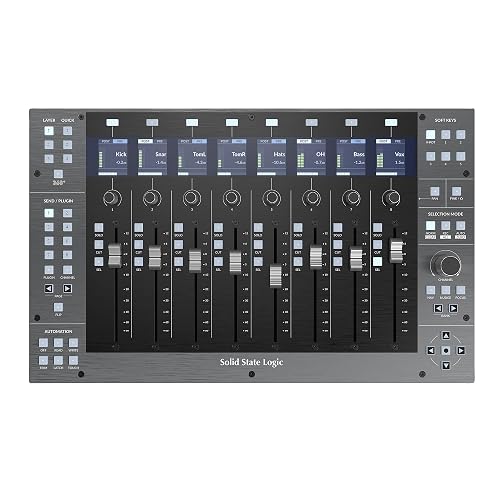
Solid State Logic UF8 Advanced DAW Controller
Observed
Best for: Engineers who mix in Logic Pro every day, may also work in a second or third DAW, and want a metal surface that can grow to 32 faders.

Behringer X-TOUCH ONE Universal Control Surface with Touch-Sensitive Motor Fader and LCD Scribble Strip
Observed
Best for: A Logic Pro user recording at home who wants a real motor fader, transport keys and a jog wheel for automation rides, on a budget under $200.


Arturia BeatStep Pro Controller and Sequencer — Aftertouch, Velocity Sensitive, With 2 Independent Melodic Sequencers, Drum Sequencer, 16 Drum Pads, MIDI/CV/Gate I/O and Music Production Software
Observed


iCON Pro Audio P1-M DAW Control Surface with Motorized Faders
Observed
Frequently asked questions
Do I need motorized faders or will manual faders do?
Motorized faders sync to the software's current mix and are worth it if you switch between sessions or automate mixes often. Manual faders are cheaper and fine if you mostly build one mix at a time and do not need the surface to reflect changes made elsewhere.
Will a control surface work with any DAW?
Most speak the Mackie Control protocol, which covers broad support across major DAWs, but deep integration, channel names, plugin control, varies a lot by brand and software. Check the manufacturer's supported-DAW list before buying if deep integration is the point.
Is a DAW controller worth it if I mostly use a mouse?
If mixing several tracks at once with a mouse feels slow or imprecise, yes. If you produce mostly in the piano roll and rarely touch a full mix, the money is better spent on a keyboard controller instead.