Best DAW Control Surfaces

Updated · Researched and written by Elan Harpaz · How we pick

Short answer

For most people the best daw control surface is the PreSonus FaderPort V2, $209.99 when we checked it on 2026-10-19. Riding one track at a time with real fader feedback, in whatever major DAW you already run.

Best on a budget:
Korg nanoKONTROL2 ($67.99 on 2026-10-01). A first fader bank for someone mixing in the box who just needs hands on eight channels at once.
Best for most people:
PreSonus FaderPort V2 ($209.99 on 2026-10-19). Riding one track at a time with real fader feedback, in whatever major DAW you already run.
Best if you want the most:
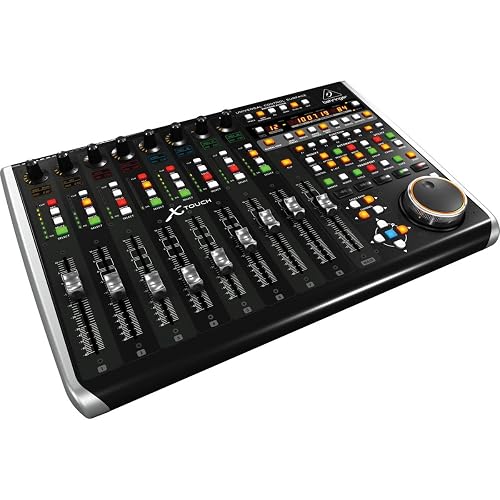
Behringer X-Touch ($419 on 2026-10-01). Mixing a whole section at once, with faders and scribble strips for every channel in view.

Researched, not tested: we have not handled these products. Verdicts come from published specs, owner reviews read at volume, and our own weekly price record. No paid placements, and commissions never change our rankings.

A control surface for mixing is not a MIDI keyboard. Its job is faders, transport and navigation, so you stop drawing automation with a mouse and stop hunting for play and record on a keyboard shortcut. The right one depends on how many channels you touch at once and how much desk space you're willing to give up.

This category doesn't have one dominant Reddit thread to build a ladder from, so this lineup comes from manufacturer specs and Amazon owner-review counts and ratings as of August 2026, cross-checked against the price ladder across the catalog. What separated the picks:

  • Motorized vs static faders, since only motorized faders move on their own to show automation you already wrote
  • Native MCU/HUI support, which decides whether a surface just works in your DAW or needs manual mapping
  • One fader versus a full bank, a real workflow difference, not just a price difference
  • Desk footprint, because a 9-fader console eats space a slim strip does not
Editor's Choice

PreSonus FaderPort DAW Controller (FaderPort V2)

Best for: Riding one track at a time with real fader feedback, in whatever major DAW you already run.

One 100 mm motorized, touch-sensitive fader with native HUI and Mackie Control support for Logic, Cubase, Ableton Live and Pro Tools.

$209.99 observed

Check price on Amazon

Our take

The PreSonus FaderPort V2 is the default pick here. One motorized, touch-sensitive fader plus native HUI/MCU support covers Logic, Cubase, Ableton Live and Pro Tools as well as Studio One, and at about $210 it's the desk-sized way to stop mixing with a mouse without giving up a third of your desk to a console.

If you genuinely mix more than one track at a time and want the full-bank feel, the Behringer X-Touch's nine motorized faders and eight scribble strips are the closest thing on this page to a real console, at about double the FaderPort's price. If you want that same one-fader idea but need a full bank, PreSonus's own FaderPort 8 gets you eight motorized faders and scribble strips for around $466, and Behringer's X-Touch One is the single-fader sibling of the X-Touch for about $189. Neither of those is a general recommendation here, they're the same ladder in different sizes. If mixing isn't the job and you actually want pad-and-knob control for Ableton or a hybrid hardware setup, the Akai MIDImix and Novation Launch Control XL 3 are built for that instead.

Basis: this category doesn't have one dominant Reddit thread behind it, so the pick set comes from the manufacturers' specs, Amazon owner-review counts and ratings as of August 2026, and the price ladder across the catalog. Specs are the manufacturers'. Ratings score each surface on the merits with price left out, so the premium pick sits highest, and the tier only tells you where a pick sits on price. We track listings and prices; we have not hands-on tested these.

How to choose daw control surfaces

A control surface only earns a slot if it does something your mouse and keyboard shortcuts don't. Work out which of these you need before price:

  • Motorized faders: these move on their own to show automation you already wrote, so you see and touch the mix at once. Static faders, like the nanoKONTROL2's, just send a value and stay put.
  • MCU/HUI protocol: Mackie Control and HUI are the standard languages a surface uses to talk to a DAW. Support means transport, pan and record-arm map automatically, like on the FaderPort or X-Touch. Without it, you map by hand per DAW.
  • One fader vs a full bank: a single fader like the FaderPort V2's is fast for riding one track but means re-assigning it constantly. Eight or nine faders let you touch a whole mix section at once.
  • Desk footprint: a slim strip sits under a laptop. A 9-fader console runs close to two feet deep and wants its own space.
  • Software bundles: several ship with DAW software, Ableton Live Lite and Studio One Artist among them, at the time of writing.

One fader is not a downgrade if one track at a time is genuinely how you mix.

At a glance

Budget Pick★ 7.8
Korg nanoKONTROL2 Slim-Line USB Control Surface, Black

Korg nanoKONTROL2 Slim-Line USB Control Surface, Black

Eight faders and eight knobs with full transport and marker controls, USB-powered, for about $71.

Connectivity
USB
Compatible devices
Laptop
Faders / knobs
8 faders, 8 knobs, transport and marker controls
Motorized faders
No, short-throw and static

Currently unavailable

Editor's Choice
Best Value★ 8.6
PreSonus FaderPort DAW Controller (FaderPort V2)

PreSonus FaderPort DAW Controller (FaderPort V2)

One 100 mm motorized, touch-sensitive fader with native HUI and Mackie Control support for Logic, Cubase, Ableton Live and Pro Tools.

Connectivity
USB 2.0, wired
Compatible devices
Various DAWs (Mac, Windows, iPad)
Fader
1x 100 mm motorized, touch-sensitive
Protocol
Native Studio One, plus HUI and Mackie Control emulation

$209.99 observed

Check price on Amazon

Best DAW Control Surfaces compared

Korg nanoKONTROL2 Slim-Line USB Control Surface, PreSonus FaderPort DAW Controller (FaderPort V2), Behringer X-TOUCH Universal Control Surface with 9 Touch-Sensitive Motor Faders compared on tier, price, our rating, and who each one is for.
PickTierPrice, and when observedOur ratingBest for
Korg nanoKONTROL2 Slim-Line USB Control SurfaceBudget Pick$67.99 on 2026-10-017.8 / 10A first fader bank for someone mixing in the box who just needs hands on eight channels at once.
PreSonus FaderPort DAW Controller (FaderPort V2)Best Value$209.99 on 2026-10-198.6 / 10Riding one track at a time with real fader feedback, in whatever major DAW you already run.
Behringer X-TOUCH Universal Control Surface with 9 Touch-Sensitive Motor FadersPremium Pick$419.00 on 2026-10-019.1 / 10Mixing a whole section at once, with faders and scribble strips for every channel in view.

The full breakdown

Budget Pick★ 7.8 / 10
Korg nanoKONTROL2 Slim-Line USB Control Surface, Black

Currently unavailable

Korg nanoKONTROL2 Slim-Line USB Control Surface, Black

Best for: A first fader bank for someone mixing in the box who just needs hands on eight channels at once.

The Korg nanoKONTROL2 is the cheap way to stop mixing with a mouse. At about $71, it's the least expensive pick here, and it still covers eight faders, eight knobs and a full set of transport buttons.

Each of the eight channels gets its own fader, knob and record/mute/solo buttons, plus dedicated play, stop, record and marker-navigation controls. It runs on USB bus power alone, no separate supply, and the slim body is thin enough to sit under a laptop.

The tradeoffs match the price. The faders are short-throw and not motorized, so they can't move to show automation you already wrote. It doesn't speak Mackie Control or HUI either, so most DAWs need it mapped by hand. And there's no display, so channel assignments live in memory, not on the hardware.

What we like

  • + Eight faders and eight knobs cover a full channel strip's worth of mixing at once
  • + USB bus-powered, no separate power brick to carry
  • + Slim, low-profile body fits under a laptop or keyboard without eating desk space
  • + Lowest price in the ladder, the cheap way to stop mixing with a mouse

Watch outs

  • - Faders are short-throw and not motorized, so they can't show existing automation
  • - No native Mackie Control or HUI support, needs manual mapping per DAW
  • - No display, so channel assignments live in memory rather than on the unit

Full specs

ConnectivityUSB
Compatible devicesLaptop
Faders / knobs8 faders, 8 knobs, transport and marker controls
Motorized fadersNo, short-throw and static
MaterialStainless steel top plate
ModelNANOKON2BK
Best ValueEditor's Choice★ 8.6 / 10

PreSonus FaderPort DAW Controller (FaderPort V2)

Best for: Riding one track at a time with real fader feedback, in whatever major DAW you already run.

The PreSonus FaderPort V2 is the desk-sized sweet spot: one fader instead of eight, but motorized and touch-sensitive instead of a plain slider. At about $210, it's roughly three times the nanoKONTROL2, for a different kind of control entirely.

The 100 mm motorized fader moves on its own to show automation you already wrote, and it's touch-sensitive enough to grab mid-move. It natively controls Studio One and speaks HUI and Mackie Control for Logic, Cubase, Ableton Live and Pro Tools. At the time of writing it ships with Studio One Artist, Ableton Live Lite and the Studio Magic plug-in suite.

The catch is in the name: one fader. Mixing more than a channel means constantly re-assigning it rather than reaching for the right one. There's no scribble strip or display, so track names stay on your screen, and the connection is wired USB 2.0 only, no wireless.

What we like

  • + 100 mm motorized, touch-sensitive fader gives visual and tactile automation feedback
  • + Native HUI and Mackie Control emulation works with virtually every major DAW
  • + Software bundle at the time of writing includes Studio One Artist, Ableton Live Lite and Studio Magic
  • + Compact single-channel footprint fits next to a keyboard without taking over the desk

Watch outs

  • - Only one fader, so mixing more than one channel means constant re-assigning
  • - No scribble strip or display, track names aren't shown on the hardware
  • - Wired USB 2.0 connection only, no wireless option

Full specs

ConnectivityUSB 2.0, wired
Compatible devicesVarious DAWs (Mac, Windows, iPad)
Fader1x 100 mm motorized, touch-sensitive
ProtocolNative Studio One, plus HUI and Mackie Control emulation
Buttons24 buttons covering 40 functions
Dimensions14.21"D x 8.9"W x 4.9"H
Weight16 ounces
Premium Pick★ 9.1 / 10
Behringer X-TOUCH Universal Control Surface with 9 Touch-Sensitive Motor Faders, LCD Scribble Strips and Ethernet/USB/MIDI Interface

Currently unavailable

Behringer X-TOUCH Universal Control Surface with 9 Touch-Sensitive Motor Faders, LCD Scribble Strips and Ethernet/USB/MIDI Interface

Best for: Mixing a whole section at once, with faders and scribble strips for every channel in view.

The Behringer X-Touch is the closest thing here to a real mixing console. Nine fully motorized faders and eight LCD scribble strips for about $419, roughly double the FaderPort and still well under a professional console's price.

Each of the nine 100 mm faders is touch-sensitive and motorized, moving to show automation across a full mix section rather than one channel at a time. The scribble strips show track names and levels without a separate screen. It speaks both HUI and Mackie Control, so it drops into virtually every major DAW, and an Ethernet port adds RTP MIDI networking alongside USB.

What you pay for that is space and build. At nearly 22 inches deep, it's a real desk commitment, not something you tuck beside a keyboard. It's also Behringer: the price is right, but the switches and encoders don't feel like PreSonus's or Korg's. No software bundle is listed, unlike both cheaper picks.

What we like

  • + Nine fully motorized 100 mm faders, more than any other pick here
  • + Eight LCD scribble strips show track names and parameters at a glance
  • + Supports both HUI and Mackie Control, drops into virtually every major DAW
  • + Ethernet port adds RTP MIDI networking, not just USB

Watch outs

  • - Large footprint at nearly 22 inches deep, a real desk commitment
  • - Behringer's build feel trails PreSonus and Korg at this price
  • - No bundled software listed, unlike both cheaper picks

Full specs

ConnectivityUSB, Ethernet (RTP MIDI)
Compatible devicesLaptop, Desktop (Windows, macOS)
Faders9x fully motorized, touch-sensitive, 100 mm
Scribble strips8x LCD
ProtocolHUI and Mackie Control (MCU)
Dimensions21.9"D x 14.9"W x 6.5"H
ColorBlack

Compare these head to head

Frequently asked questions about daw control surfaces

Do I need a DAW control surface if I already have a MIDI keyboard?▾

Only if you're mixing, not just playing. A keyboard's pads and knobs are built for playing and tweaking instruments, while a control surface's faders and transport are built for riding levels and running the DAW hands-on, a different job entirely.

What's the difference between motorized and non-motorized faders?▾

Motorized faders physically move to show automation you already wrote, so what you see matches what's playing. Static faders, like the nanoKONTROL2's, just send a value from wherever you leave them and don't reflect existing automation.

Does a control surface work with every DAW?▾

Only if it speaks Mackie Control (MCU) or HUI, the two standard protocols most DAWs recognize. The FaderPort V2 and X-Touch both support them. A surface without native support, like the nanoKONTROL2, has to be mapped by hand per DAW.

Is one fader, like the FaderPort's, enough?▾

For riding a single channel or writing automation on one track at a time, yes. For mixing a whole session at once, eight or nine faders like the X-Touch's let you see and touch more of the mix without re-assigning anything.

Is the Behringer X-Touch worth the price over the FaderPort?▾

If you want a full mixing section, nine motorized faders and eight scribble strips at once, yes. If you mainly ride one or two tracks at a time and want to save desk space, the single-fader FaderPort V2 does that job for about half the price.

Do control surfaces include software?▾

Some do. The FaderPort V2 ships with Studio One Artist, Ableton Live Lite and the Studio Magic plug-in suite at the time of writing. The nanoKONTROL2 and X-Touch don't list a bundle, so check the current listing before buying on that basis.

More buying guides

We may earn a commission from qualifying purchases made through links on this page, at no extra cost to you. We only recommend products we would tell a friend to buy, and commissions never change our picks.